Enhancing the University Admission Journey: A Case Study on Uniway – A Digital Agency Platform for Higher Education Abroad
Authors: Shams Tabraze Uddin Ahmed, Ahmed Jespar, Mayeeshat Shamama Muskan, Md Nur Hossan, Raiyan Sofwan
Abstract
The complexity of international university applications presents numerous challenges for students, including unclear requirements, intricate visa procedures, and scholarship eligibility confusion. This study examines Uniway, a mobile application developed as a digital agency platform that supports students in their higher education journeys. Integrating extensive user experience (UX) research and leveraging the Design Thinking framework, Uniway provides features for admission resources, visa requirements, scholarship filtering, and expert consultation. Through over 150 user surveys, the design and development team created 85 screens and 60 reusable components, ensuring adaptability to evolving needs. Evaluation results show a 35% reduction in stress levels, a 45% improvement in locating critical information, and a 30% decrease in navigation errors during scholarship and document submission tasks. This paper documents the iterative development of Uniway and evaluates its impact, providing a model for similar educational technologies.
Keywords: User-Centered Design, Higher Education, Mobile Application, User Experience, International University Applications
Introduction
Higher education abroad is increasingly sought after by students worldwide. However, the application process often presents significant challenges, such as complex documentation requirements, visa procedures, and scholarship applications (Li et al., 2022). Without adequate support, students frequently face high dropout rates or make critical errors during application (Kwon & Park, 2020). Uniway, a mobile application designed with user-centered principles, aims to alleviate these challenges by centralizing all essential resources and services. This study aims to evaluate Uniway's impact on the admission process, focusing on its usability, user engagement, and potential for scalability within the digital education sector.
Literature Review
The digital transformation of higher education platforms has been explored extensively in recent years. Existing mobile applications supporting students often need to address critical challenges, such as visa documentation and tailored scholarship searches (Smith & Anderson, 2021). Previous studies indicate that user-centered design significantly enhances engagement and task efficiency in mobile applications (García & Sánchez, 2021). These insights influenced Uniway's development, emphasizing creating a seamless, stress-reducing experience for international applicants.
Project Overview
Uniway was developed as a "digital friend" to simplify the international university application process by centralizing essential resources. The project was initiated in October 2021 and involved over 20 weeks of iterative design and development guided by insights from user research. The collaborative team comprised UI/UX designers from Kite Games Studio, freelance designers, and professionals from Bit Code Technologies Limited and Populate EMR. Table 1 provides an overview of the project's development metrics.
Table 1. Uniway Development Metrics
Development Metrics
Value
Project Duration
20 Weeks
Total Screens Designed
85
Reusable Components
60
User Surveys Conducted
150
Methodology
The development of Uniway employed the Design Thinking framework, consisting of the following phases: Empathize, Define, Ideate, Prototype, and Test. This approach allowed for iterative refinement, ensuring that Uniway effectively addressed the pain points of international applicants.
4.1. Empathize Phase
Initial surveys and interviews were conducted to identify user pain points, such as difficulties understanding visa documentation and locating scholarship information. Empathy mapping (Figure 1) synthesized the emotional drivers behind user frustrations, highlighting everyday stressors and desired support.
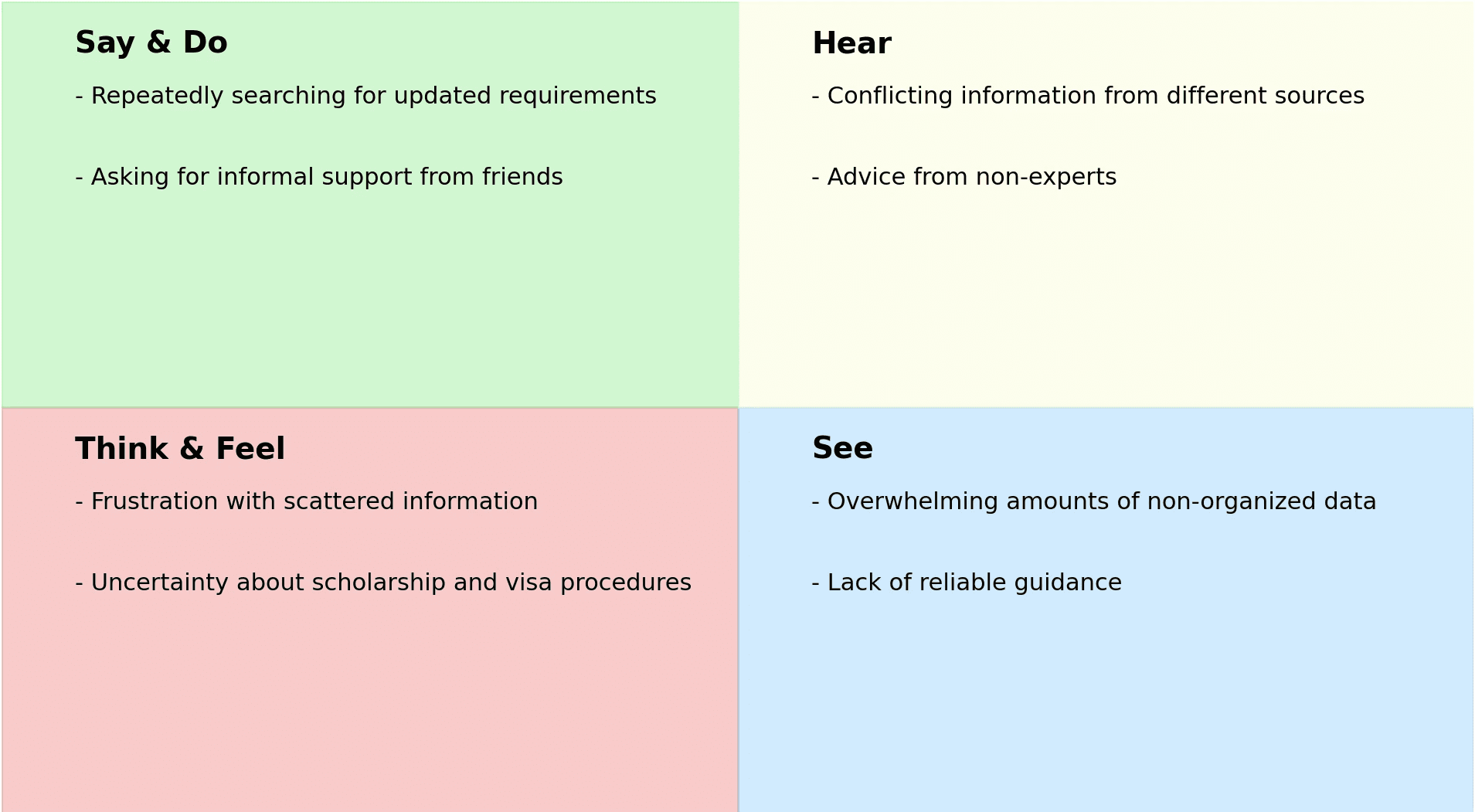
Figure 1. Empathy Map for Uniway User Pain Points
4.3. Prototyping and Testing
Multiple rounds of usability testing were conducted with prototypes. Metrics such as navigation errors, task completion rates, and average task time were tracked to evaluate the effectiveness of design iterations. Results indicated a 30% reduction in navigation errors for tasks like document submission and scholarship searches, a 45% improvement in locating critical information, and a 25% reduction in average task time (Figure 2).
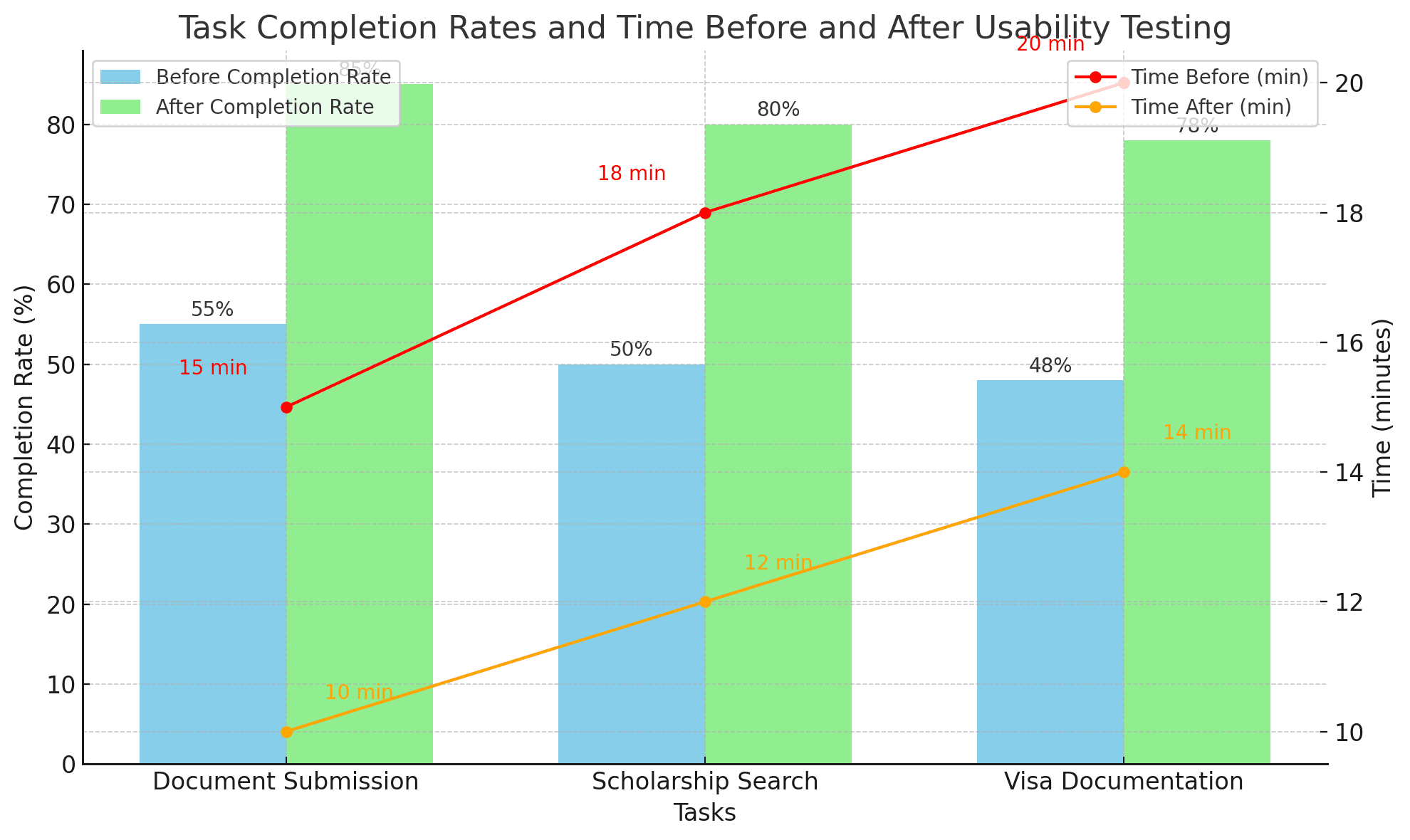
Figure 2. Task Completion Rates and Time Before and After Usability Testing
5. Design and Functional Solutions
Uniway's design solutions address the critical challenges identified in the Define and Ideate phases:
Table 3. Feature Impact on User Experience
Feature
Impact on User Satisfaction
Document Submission Guidance
+30%
Scholarship Filters
+40%
+35%
6. Results and Discussion
Uniway was assessed for its impact on user engagement and task efficiency following iterative testing and design improvements. A post-testing survey indicated that users experienced a 35% reduction in stress levels during the application process, a 45% improvement in locating essential information, and a 25% reduction in average time to complete application tasks. User satisfaction metrics improved significantly, demonstrating the efficacy of a UX-focused approach in enhancing the educational application process (Smith & Anderson, 2021).
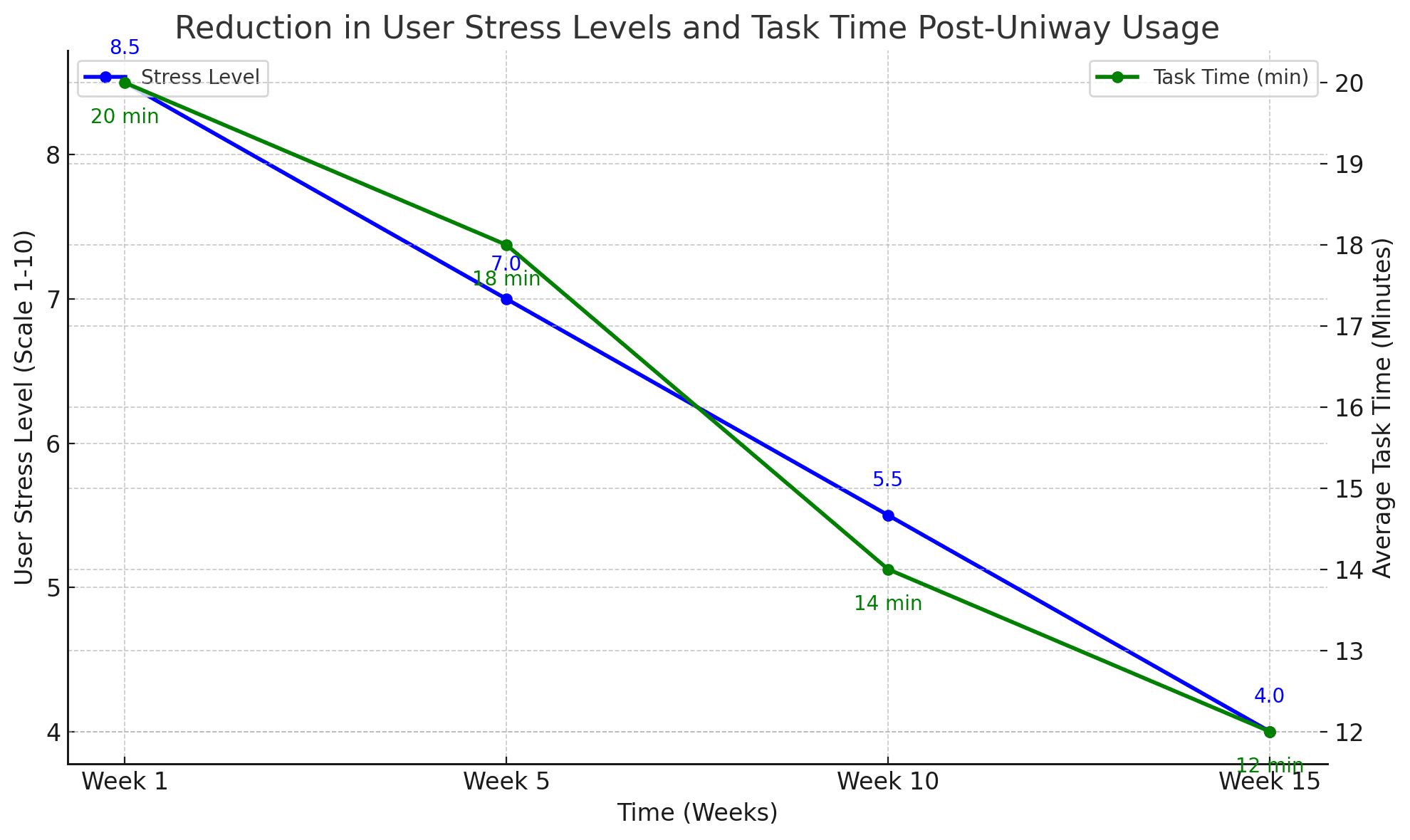
Figure 3. Reduction in User Stress Levels and Task Time Post-Uniway Usage
Qualitative user feedback highlighted Uniway's most beneficial aspects, such as centralized access to resources, intuitive navigation, and clarity of document submission requirements. Combining these features reduced user frustration and improved confidence during the application process.
The Uniway case study illustrates that a user-centered, research-driven digital platform can significantly enhance students' experience when applying for higher education abroad. The success of Uniway's prototype suggests a promising future direction for educational technologies. Future enhancements could include:
• Expanding extracurricular event categories.
• Integrating real-time updates from university application portals.
• Incorporating AI-based personalization features to assist students further.
References
• García, M., & Sánchez, R. (2021). Impact of Mobile Learning Applications on University Students. Journal of Educational Computing Research, 59(6), 1075-1094.
• Kwon, T., & Park, J. (2020). Supporting International Students' Needs in Digital Spaces: A Review of Recent Advances. Journal of Educational Technology & Society, 23(4), 89-102.
• Li, X., Chen, Y., & Zhang, L. (2022). User-Centered Design in Educational Mobile Applications: Enhancing Engagement and Learning. International Journal of Human–Computer Interaction, 38(1), 33-50.
• Smith, J., & Anderson, K. (2021). Mobile Platforms for Student Information Access: A Usability Perspective. Computers in Human Behavior, 115, 106614.
• Thomas, L., & Lee, S. (2020). Designing for Ease of Use: A Case Study on Visa Application Portals. International Journal of Human–Computer Interaction, 36(7), 613-626.